
How to Make Money on Facebook?

 Fatih
Fatih
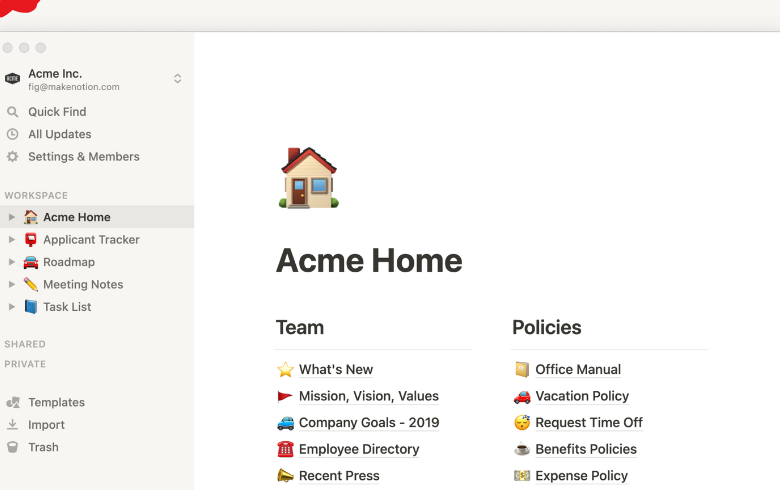
The life of a modern student is a constant balancing act. On any given Tuesday, you are likely tracking assignment deadlines, organizing lecture notes, coordinating group project deliverables, and managing a personal life—often split across half a dozen different apps, sticky notes, and browser tabs. This fragmented approach leads to lost documents, missed deadlines, and unneeded academic stress.
If you are looking for a way to streamline your student life, bringing your entire academic workflow under one roof is the single best decision you can make. Understanding why you should use Notion for school comes down to recognizing that it is far more than a basic note-taking app. It serves as a fully customizable digital headquarters for your education, giving you total control over how you manage your studies.
The primary reason why you should use Notion for school is its ability to replace multiple subscription services with a single, unified workspace. Instead of opening one app for your calendar, another for to-do lists, and a third for storing PDF handouts, Notion combines all these tools into a single platform.
When you open your workspace at the start of a study session, you can view your entire semester at a high level.
Live Class Schedules: Visual timetables that display your daily lecture locations, professor office hours, and video call links.
Master Assignment Trackers: Filtered views showing upcoming homework deadlines ranked by urgency or subject.
Course Resource Vaults: Dedicated spaces for syllabus documents, reading lists, and lecture slide downloads.
Personal Life Management: Integrated sub-pages for budget tracking, habit tracking, and club meeting agendas.
Traditional file folders keep your information trapped in silos. A PDF saved in a generic folder has no connection to your calendar or your lecture summaries. Notion changes this paradigm through relational databases, allowing you to link disparate pieces of information together seamlessly.
Imagine working on a major end-of-semester research paper. Within Notion, you can create a single master database entry for that paper and link it directly to specific class lecture notes, cited journal articles, and individual action items on your to-do list.
When you click on the assignment, every piece of research and every task associated with it appears on your screen instantly. You spend zero time searching through nested desktop folders and all your time actually writing.
Taking clean notes feels productive, but passive re-reading is one of the least effective ways to prepare for exams. Another compelling reason why you should use Notion for school is how easily its core formatting features align with evidence-based study techniques like active recall and spaced repetition.
The platform features built-in formatting blocks designed specifically to test your memory:
> Sample Flashcard Setup using Notion Toggles ▶ Question: What is the primary function of Mitochondria in a cell? [Click to open toggle] Answer: To generate most of the chemical energy needed to power the cell's biochemical reactions (ATP).
By hiding answers inside collapsible toggle blocks, you can turn your standard class notes into digital flashcards without needing third-party study apps. You test your recall out loud before clicking the toggle to check your accuracy, turning passive lecture reviews into an interactive self-quiz session.
| Traditional Note Apps | The Notion Setup |
| Structure | Rigid, pre-set folder trees |
| Databases | Basic text searching across isolated documents |
| Pricing | Often locked behind monthly subscriptions |
| Collaboration | Basic text sharing with limited permissions |
Group assignments are notoriously chaotic when team members rely on endless email chains or messaging group chats. Notion transforms group collaboration by acting as a real-time project management hub.
You can create a shared project page, invite your classmates, and assign specific tasks with hard due dates using Kanban boards or shared Gantt-style timeline views.
Everyone on the team can view who is responsible for which research section, leave comments directly on specific paragraphs, and monitor real-time progress toward the final deadline. It eliminates confusion over version control and keeps every member accountable.
No two students process information in the exact same way. Linear thinkers might prefer structured, text-heavy tables, while visual learners thrive using image-rich gallery views and color-coded tags.
Notion allows you to build a system tailored specifically to your brain. You can start with a clean slate or leverage thousands of community-built templates designed for high school, university, and graduate-level workflows.
You can add custom cover art, embed ambient study playlists, display progress bars for your reading assignments, and tweak layouts until your study space feels welcoming rather than stressful. When your digital workspace looks clean and feels intuitive, staying organized stops feeling like a chore.
"Your workspace dictates your focus. When you replace visual digital clutter with an intentional, unified system, your mind has room to actually learn."
If you are ready to explore why you should use Notion for school, setting up your first semester dashboard takes less than twenty minutes:
Claim Your Free Upgrade: Sign up using your official educational email address (.edu) to unlock Notion's free Education Plus plan features, giving you unlimited file upload limits and expanded guest permissions.
Create a Master Subject Database: Set up a main page for the current semester and create a database containing individual sub-pages for every class you are taking.
Build an Assignment Board: Create a task database with properties for Due Date, Status (Not Started, In Progress, Submitted), and Course Link. Switch the database view to a Calendar or Kanban view to see your upcoming week at a glance.
Download a Student Template: Save time by visiting the Notion template gallery to clone a pre-built student planner, then tweak its colors and layout to match your workflow.
Reflecting on why you should use Notion for school highlights a clear shift in personal productivity. It is far more than a place to type out lecture points; it is a personalized framework that eliminates administrative chaos, protects you from missed deadlines, and transforms complex course loads into manageable daily tasks.
By bringing your schedules, research, group assignments, and personal goals into one intuitive environment, you gain full clarity over your education. Ditch the scattered apps, set up your workspace, and give yourself the ultimate foundation for academic success this semester.
Our most popular services on social media

Special 5% discount awaits new members!
BoostGrams was founded in 2015 with the rise of social media.
Special 5% discount awaits new members!
BoostGrams was founded in 2015 with the rise of social media.
Special 5% discount awaits new members!
BoostGrams was founded in 2015 with the rise of social media.

Enter your order code!

If you experience delivery issues with your guaranteed orders, you can quickly request a replacement.


A single post can touch thousands of hearts.
Log in to your account now and start enjoying the benefits.
Not a member? Sign Up